Showing posts with label rich snippet. Show all posts

Google Search - Rich Snippet Profile Picture Using Blogger

Penulis : Admin Ashish Chaturevdi on Tuesday, 1 May 2012 | 06:57

Tuesday, 1 May 2012

I finally got my profile picture to show up below my title and next to my description for Google searches. I had a very difficult time getting it to work, the whole process took about a month. With Google it is a gradual process and it still appears to be gradually updating. Notice how my pages show different Rich Snippet data.
how to get profile picture to appear next to site, google search, rich snippet testing tool

One page will show my phony Rating and Reviews, while another just shows my profile picture. Here's the 3 different type of results people may see.
google rich snippet profile picture, how to make picture appear in google search

Here's a link to my previous attempt at How to Make Your Profile Picture Appear on Google Search . Back when i wrote that all i could get to show up in the rich snippet data was a fake rating. I still like the idea of having my page show 5 stars and 300 reviews. I think people are much more likely to click on my page when they see that.

Since that post i changed just a few things. First was replace my Blogger profile with my Google+ profile. That way i don't have to add a link like the instructions say to do, it just goes directly to the right profile.

So the link changed from this (Blogger profile): http://www.blogger.com/profile/05738850827175755919
Next i changed my profile picture. I read that some people tried to put a Logo as their profile picture but Google didn't allow it. So they must have some type of face recognition. So i changed it to something that shows an actual face. But anyway, since this has started working i've switched it back to the picture of me with goggles and a face mask on. If it stops working then i'll know it is because of the picture.
new google plus profile picture, how to add profile picture to google search
The last thing i did was get rid of excess HTML code. When i couldn't get it to work i kept trying and adding different HTML. So by the end i had 5 different versions of what i though the correct HTML code should be. That was a mistake. When i finally realized which one of the 5 codes was the right one, i removed the other 4, then checked the result on Google's Rich Snippet Testing Tool for my page.
how to, rich snippet testing tool, star rating, profile picture, google search

It seemed to be working, then 1 week later it started to show up on random pages in Google Search. But still not every page. I have no idea still why it works on some and not all of them. I guess i just have to wait some more to find out.

comments | | Read More...

How to Make Your Profile Picture Appear on Google Search

Penulis : Admin Ashish Chaturevdi on Monday, 26 March 2012 | 10:49

Monday, 26 March 2012

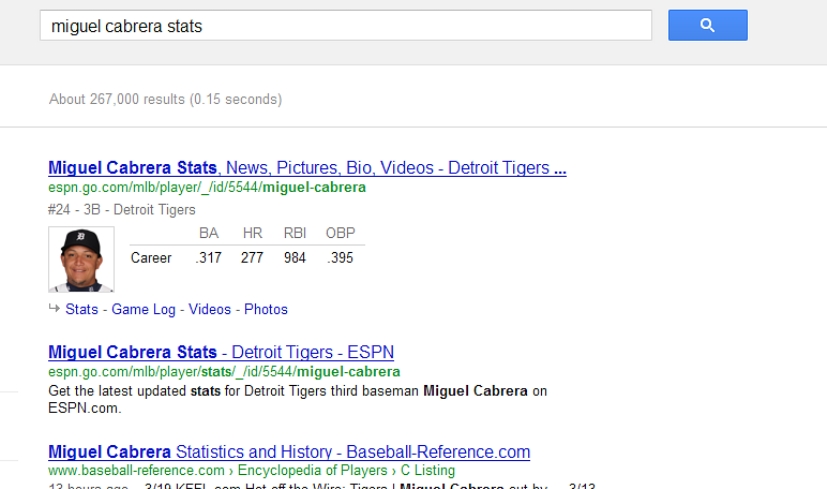
If you type "Miguel Cabrera Stats" into Google Search, you don't even have to click on any links to get the results. Google will display them automatically. As you can see below.Miguel Cabrera Stats Rich Snippet
That's because Google is working with something called Rich Snippets. It's a way for web pages to have small images or information appear for certain pages.

I've noticed it a lot of pages have a picture of the author. So i tried to figure out how to get my picture to show up next to a link for my blog. Hopefully this would add to my increasing ways to increase traffic to my blog.

I'm not going to bore you with all of the details, but it's a bit complicated. A summary of what i did is:
  • Sign up for Google+
  • Update your Google+ Profile, checking certain boxes and add profile image
  • Update your Blogger Profile and add image
  • Add a link from the Blog HTML, linking to your Google+ Profile page
  • Add one link back from Google+ Profile to your Blogger Profile and actual Blog
  • Add a rel="me" tag in your Blogger Profile
  • Add a Privacy Policy to your blog.
It took a long time to figure everything out and i thought that i finally got rid of all the errors. I was able to check that my profile was Verified using the Google Rich Snippets Testing Tool.

LinkHere's what it looks like when i checked my blog homepage. It said Verified in green and my profile picture was on the right.
Rich Snippets Testing Tool Verified
Everyone said that it would take between 2 days and a week before it shows up on Google Search properly. So I checked after 1 day...nothing. I checked after 2 days...nothing.

I was confused so i decided to look at the Rich Snippets Testing Tool page again. When i put in my Blogger Author page it seemed to work. Notice my picture on the left under the link. That's exactly how i want it to look on Google Search.
Rich Snippets Testing Tool Verified profile
So i continued checking other pages on the Rich Snippets Testing Tool page, most were like the first screenshot from above, with nothing to the left of the page title. But randomly when i put in the URL from a page i posted 5 days earlier my author image appeared. I thought "Great...it's starting to work."
Rich Snippets Testing Tool Verified author image

BUT, when i went to the actual Google Search and typed in keywords to find the page it did NOT show the image. (3rd link down)
Rich Snippets no author image
Even more confusing was that when i put the URL in for another page, it put the author image up for my sister, who had commented on that post.
I must not have clearly identified who the author was.
Rich Snippets wrong author image
During the entire process of reading about Rich Snippets, I did figure out how to add a Star rating and review number. This is typically used for pages like movie reviews. So what i did was put in 4.7 stars and 216 people, which is totally made up. But it makes it appear like my website has a high rating.
Rich Snippets star and rating
Then a few days later it appeared in Google Search. But only on some pages and only the stars and review, not my profile picture.
Rich Snippets star and user rating
The easiest way to view all the pages at once is to type "site:davewirth.blogspot.com" (without the quotes) into Google Search. It brings up all related pages for that site. It showed me 365 pages, some with stars, some without, but none with a picture.

I feel like this will be an ongoing process and expect that at some point my profile picture will show up next to some of my blog links. I was interesting learning about all of the tricks to get a website noticed. And i think that i will try adding more rich snippet data to my page. That is something that Google will continue to emphasize. But as of right now, for me, it's a lot of trial and error.

A few days later i thought that i might have figured it out with this page, it switches your Blogger Profile to link with your Google+ Profile. But still no change in the result.
Link
comments | | Read More...
 
Design Template by panjz-online | Support by creating website | Powered by Blogger